Neon Lights Text Effect: A Practical Guide to Black Friday Signage and Editable Design
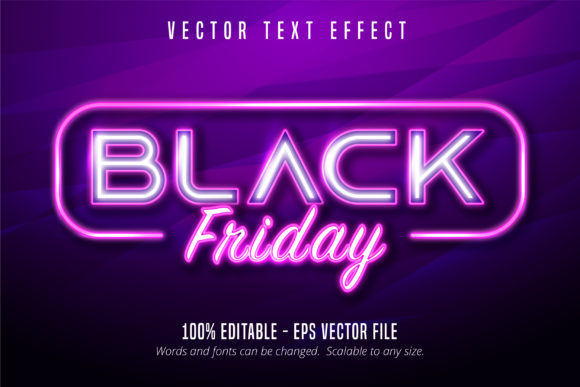
When planning a high-impact marketing campaign for events like Black Friday, visual clarity is paramount. The Neon Lights Text Effect has emerged as a distinct solution for designers who need the aesthetic of glowing signage without the limitations of standard typefaces. This resource is not merely a font file; it is a sophisticated text effect designed specifically for Adobe Illustrator. It allows professionals to create scalable, editable, and vibrant typography that mimics real neon tubes, offering a unique balance between retro charm and modern digital flexibility.
Distinguishing the Neon Lights Text Effect from Standard Fonts
The primary distinction between this tool and traditional fonts lies in its construction. Standard fonts are vector outlines or bitmap glyphs that define the shape of letters. In contrast, the Neon Lights Text Effect functions as a layer-based template. When applied, it transforms standard text into a complex composition of stroke paths, glow effects, and tube structures. This means the user retains full control over the underlying characters while applying a pre-configured lighting style.
This approach solves a common problem in graphic design: the difficulty of simulating realistic light emission using only native Illustrator tools. Creating a custom neon look from scratch requires manually drawing tubes, adding multiple layers of outer glows, setting blending modes to "Screen" or "Overlay," and managing color gradients. The Neon Lights Text Effect automates this complexity. It provides a 100% editable framework where the text remains fully modifiable, allowing users to change the content instantly while maintaining the integrity of the lighting simulation.
Technical Specifications and Workflow Efficiency
For professionals working under tight deadlines, such as those preparing last-minute Black Friday promotions, workflow efficiency is critical. This effect is delivered in an EPS CS6 file format, ensuring broad compatibility with older and newer versions of Adobe Illustrator. The file structure is optimized for scalability, meaning the design can be resized from a small mobile banner to a massive billboard without losing quality or pixelation.
The system supports 100 editable elements, which refers to the granular control over individual components of the design. Users can adjust the thickness of the "glass" tube, the intensity of the inner glow, the color temperature of the filament, and the background diffusion independently. This level of customization ensures that the final output looks professional rather than generic. Unlike static images, the text inside these effects remains live, meaning you can correct typos or update pricing details right up until the moment of publication.
Evaluating Alternatives: Hand-Created vs. Template-Based Approaches
Designers often face a choice when creating neon-style graphics: build the effect manually or utilize a specialized template. Each approach offers different tradeoffs regarding time investment, technical skill requirements, and final output consistency.
- Manual Creation: Building a neon effect from scratch using the Pen Tool and Gradient Meshes offers unlimited creative freedom. However, it is a time-intensive process. Achieving a realistic glow that interacts correctly with the background requires advanced knowledge of layer blending modes and vector masking. For a single logo, this might be acceptable, but for a series of promotional materials for a sale event, the time cost becomes prohibitive.
- Raster-Based Filters: Many designers turn to Photoshop filters or AI-generated textures. While quick, these methods lack the vector scalability required for print media. If a designer needs to print a large-scale sign for a store window, raster images often appear blurry or pixelated. Furthermore, editing the text in a raster environment often requires recreating the entire effect if the message changes.
- Specialized Vector Effects: Tools like the Neon Lights Text Effect occupy a middle ground. They provide the structural benefits of vectors (scalability) with the aesthetic speed of templates. They are particularly useful for users who want the look of neon without mastering the intricate manual techniques required to generate it from zero.
Comparing Scalability and Print Readiness
A critical factor in choosing a design asset is its ability to scale. The Neon Lights Text Effect is inherently vector-based. Whether the text is used on a 3-inch business card or a 10-foot storefront banner, the edges remain crisp. This is a significant advantage over web-only assets or low-resolution PNGs that are often distributed with free font packs. For Black Friday campaigns, where materials must span digital screens, email headers, and physical flyers, vector scalability is non-negotiable.
In comparison, some alternative "font effects" found online are actually image overlays. These require the text to be placed over a specific background size to work correctly. If the background changes or the text length varies, the effect breaks. The EPS format of the Neon Lights Text Effect avoids this dependency, allowing the design to adapt fluidly to any canvas size or layout constraint.
Best-Fit Situations and Decision Factors
Understanding when to deploy this specific effect versus other design strategies is essential for effective communication. The Neon Lights Text Effect excels in scenarios requiring high visibility and emotional engagement.
It is an ideal choice for Black Friday signage. The high-contrast nature of neon colors naturally draws the eye, making it perfect for highlighting discounts, limited-time offers, and urgent calls to action. The "glowing" property of the effect creates a sense of energy and excitement that aligns well with the frenetic atmosphere of holiday sales. Additionally, because the text is editable, marketing teams can easily swap out product names or price points without needing to redesign the entire graphic.
However, there are situations where this effect may not be the optimal choice. For minimalist brand identities that prioritize subtlety and clean lines, the heavy visual weight of a neon effect might feel too aggressive or distracting. Similarly, for applications where the design will be viewed strictly on low-resolution mobile devices without high dynamic range (HDR) support, the subtle gradients and glow effects might lose their impact, rendering the text looking flat or muddy.
Limitations and Considerations
While highly versatile, the Neon Lights Text Effect does have limitations. The file size can be larger than a simple font file due to the complex layer structures required to simulate the light. This may require slightly more processing power when opening the file on older hardware. Additionally, the effect relies on specific blending modes that may behave differently depending on the version of Illustrator or the export settings used. Designers should always preview the final output in the intended medium (web, print, or video) before committing to the final design.
Another consideration is the learning curve. While the effect is marketed as "very easy to edit," it still requires a basic understanding of the Layers panel in Illustrator. Users must know how to isolate specific groups within the file to change colors or text without disrupting the underlying glow mechanics. For absolute beginners who have never used vector software, the manual creation method or a simpler font download might be less intimidating, though they sacrifice the professional polish of the neon simulation.
Making the Right Choice for Your Project
Selecting the right design asset comes down to balancing aesthetic goals with technical constraints. If the priority is speed, scalability, and a high-end look that stands out in a crowded marketplace, the Neon Lights Text Effect offers a compelling solution. It bridges the gap between the artistic flair of hand-drawn neon and the practicality of vector templates.
For professionals evaluating resources for upcoming seasonal campaigns, the key is to test the asset against your specific workflow. Check if the EPS CS6 format integrates smoothly with your existing library. Verify that the 100 editable components allow for the variations you need. Ensure that the text remains legible at various sizes. By conducting these practical checks, designers can determine if this tool fits their specific needs better than standard fonts or raster-based alternatives.
In the competitive landscape of digital marketing, visual differentiation is a powerful asset. The Neon Lights Text Effect provides a reliable method to achieve a distinctive look that resonates with audiences looking for excitement and value. Whether used for a digital ad, a social media graphic, or a physical sign, its editable nature and scalable vector foundation make it a robust tool for modern design challenges.